What Is This?
Answering Agent provides AI customer support for car washes. When integrated with NXT Wash, your AI agent can:- Answer every call - No missed calls, even during rushes
- Recognize customers instantly - “Hi Mike, I see your Unlimited plan…”
- Process cancellations - Handle cancel requests with reason tracking
- Reactivate memberships - Restart a cancelled membership during the call
- Update license plates - Change vehicle info on the spot
- Access vehicle details - See all cars on the account
- Add vehicles - Put a new car on an existing account
- Answer billing questions - Recent charges, charge details, and the card on file
- Handle multiple vehicles - Manage customers with several cars on their account
- Work 24/7 - After-hours calls handled just like daytime
Why Car Washes Choose NXT Wash + AI
Instant Customer Recognition
AI identifies callers by phone and greets them by name with their account details.
Reactivate Memberships
AI restarts a cancelled membership during the call. Customer wants to come back? Done instantly.
Billing Answers
AI looks up recent charges, explains a specific charge, and reads back the masked card on file.
Update License Plates
New car? AI updates the license plate on the account during the call.
Multi-Vehicle Support
AI sees all vehicles on an account and confirms which one to cancel or modify.
Always Available
Early morning or late night calls get the same service as midday calls.
Required Fields to Configure
That’s it. Just your NXT Wash login credentials.
Setup Steps
1
Get Your NXT Wash Login
Use your existing NXT Wash portal username and password. Must have admin/API access.
2
Add Integration in Answering Agent
Go to Answering Agent Dashboard → Integrations → Add Integration → NXT Wash.
3
Enter Credentials
Enter your NXT Wash username and password.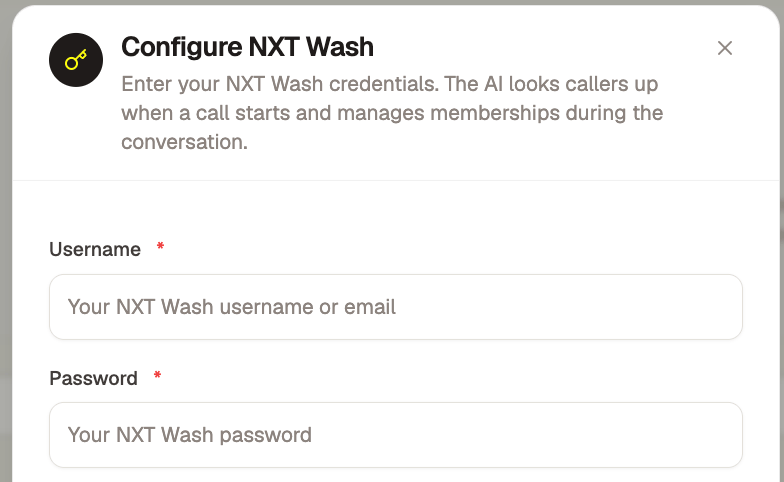
4
Test Connection
Click “Test Connection” to verify access.
5
Enable Integration
Turn it on. Your AI now connects to NXT Wash during calls.
How It Works
Common Issues & Fixes
Login fails
Login fails
Cause: Wrong credentials or no API accessFix:
- Verify login works at NXT Wash portal
- Contact NXT Wash to confirm API access is enabled
- Use full email as username if that’s your login format
Wrong vehicle cancelled
Wrong vehicle cancelled
Cause: Multiple vehicles, AI didn’t confirm which oneFix: Update AI instructions to always confirm vehicle choice with customer.
Customer not found
Customer not found
Cause: Phone number doesn’t match NXT Wash recordFix: AI will ask for alternate number. Update primary phones in NXT Wash when possible.
Test Checklist
- Connection test passes
- Test call shows customer name
- AI finds membership and vehicles
- AI handles multiple vehicles correctly
- AI asks for cancellation reason
- AI cancels membership for specific vehicle
- AI reactivates a cancelled membership
- AI looks up recent charges
- AI updates license plate on vehicle
- AI handles already-cancelled gracefully
Related Integrations
Sonny's
AI integration for Sonny’s Car Wash
WashAssist
AI integration for WashAssist
AMP
AI integration for AMP Memberships
Need Help?
Contact support@answeringagent.com with:- Your NXT Wash username
- Error message
- Call ID if issue happened during a call