> ## Documentation Index
> Fetch the complete documentation index at: https://docs.answeringagent.com/llms.txt
> Use this file to discover all available pages before exploring further.
# Partner API authentication
> How resellers authenticate with the Answering Agent Partner API.
## Overview
The Partner API is for reseller accounts that provision Answering Agent for their own customers. It manages organizations, users, locations, partner links, and embed tokens. It authenticates with an API key from your partner account.
The base URL is `https://answeringagent.com/api/v1`.
The Partner API accepts keys from reseller accounts only. A key from a regular Answering Agent team gets `401` with `{"error": "Invalid credentials"}`. To read your own team's conversations, tasks, contacts, and reports, use the [Customer API](/api/overview).
This documentation covers the **Partner API** for building integrations. If you're looking to embed the Answering Agent dashboard in your application, see the [Embed Guide](/advanced/embed) after completing initial setup.
***
## How Authentication Works
1. **Generate an API Key** from your Answering Agent partner dashboard
2. **Include the key** in the `X-API-KEY` header for every API request
3. **Access granted** - The API key identifies your partner account and provides access to your customer organizations
Requests are not signed and carry no timestamp. The key is the only credential, so keep it on your server and treat it like a password.
***
## Obtaining Your API Key
Log in to the Answering Agent dashboard with your partner account credentials.
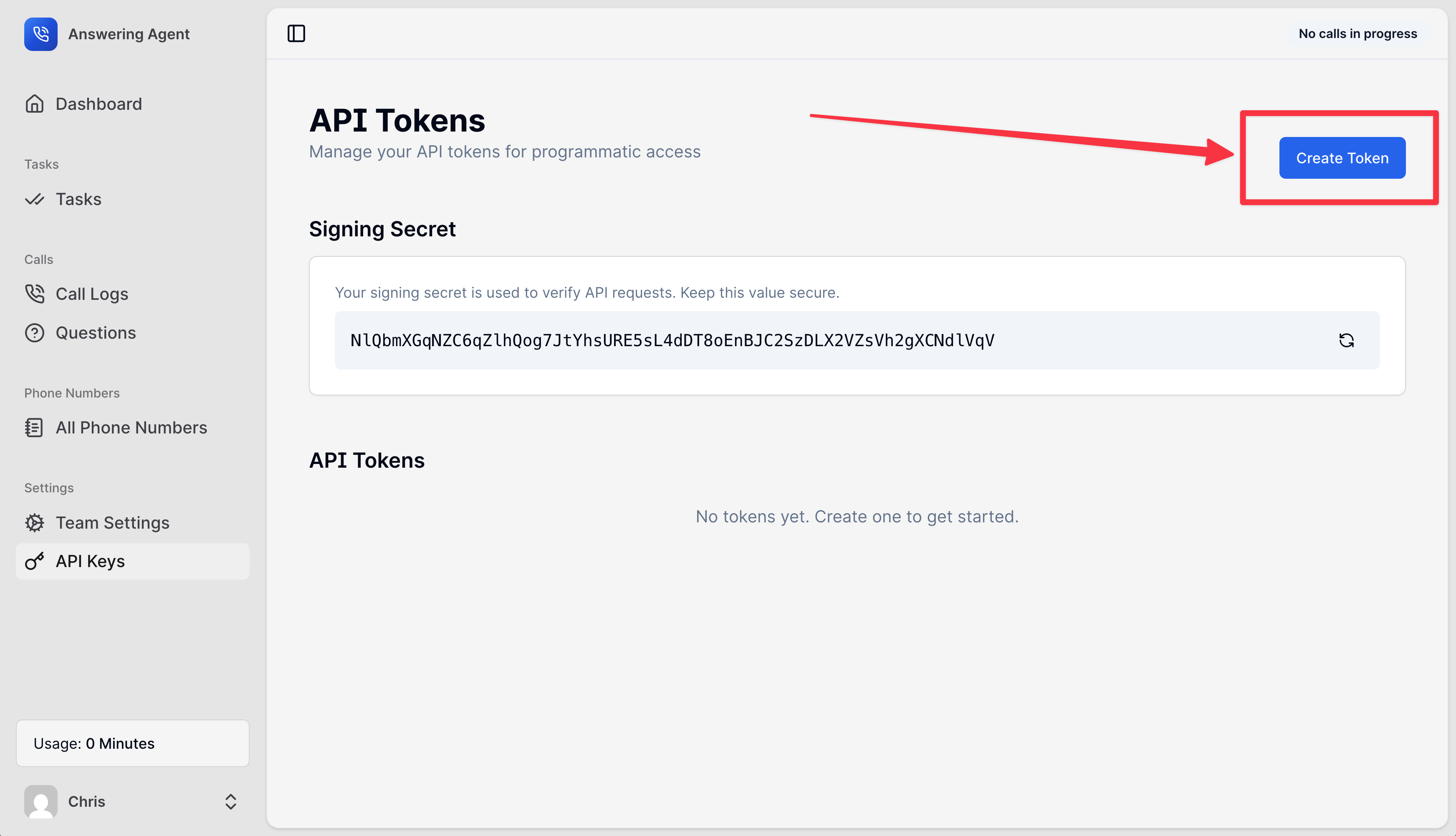
Go to **Settings → API Keys** in the dashboard navigation.
Click **New API Token**, enter a token name, and click **Create**. The dashboard shows the key once, so copy it now.
Save the key in your backend environment variables or secrets manager. Never expose it in client-side code.
API keys are shown only once when created. If you lose a key, you'll need to generate a new one and update your integration.
A key looks like `123|AbCdEf0123456789...`: a number, a `|`, and a secret. Send the whole string.
 ***
## Using Your API Key
Include your API key in the `X-API-KEY` header for every request to the Partner API:
```bash theme={null}
curl -X GET "https://answeringagent.com/api/v1/organizations" \
-H "X-API-KEY: 123|AbCdEf0123456789AbCdEf0123456789AbCdEf01234" \
-H "Content-Type: application/json"
```
```javascript theme={null}
const res = await fetch('https://answeringagent.com/api/v1/organizations', {
headers: {
'X-API-KEY': process.env.ANSWERING_AGENT_API_KEY,
'Content-Type': 'application/json',
},
});
if (!res.ok) throw new Error(`${res.status}: ${await res.text()}`);
const organizations = await res.json();
```
### Required Header
Your API key from the partner dashboard. All partner API endpoints require this header.
***
## Response Codes
| Status | Meaning | Typical Cause |
| - | - | - |
| 200/201 | Success | Request completed successfully |
| 401 | Unauthorized | Missing or invalid `X-API-KEY` header, or a key from an account that is not a reseller |
| 403 | Forbidden | API key valid but lacks permission for this resource |
| 404 | Not Found | Resource doesn't exist or doesn't belong to your partner account |
| 405 | Method Not Allowed | The endpoint does not support that HTTP method |
| 422 | Validation Error | Request data is invalid or incomplete |
| 429 | Too Many Requests | Partner link invites and updates allow 10 requests per minute. Wait for `Retry-After` seconds. |
| 500 | Server Error | Unexpected error on our side - contact support |
Authentication errors return `{"error": "..."}`: `API key is required` when the header is missing, and `Invalid credentials` otherwise. Other errors return `{"message": "..."}`. A `422` also includes `errors`, keyed by field.
***
## Understanding Token Types
Answering Agent uses different authentication methods for different purposes. As a partner integrator, you only need to worry about **API Keys**.
| Token Type | You Need This For | How to Get It |
| - | - | - |
| **API Key** | Managing customer organizations via Partner API | Dashboard → Settings → API Keys |
| **Embed Token** | Embedding dashboards in your application | API endpoint `/api/v1/users/{external_id}/embed-token` |
***
## Example Integration
Here's a complete example of authenticating and creating your first customer organization:
```bash theme={null}
# Store your API key securely
API_KEY="123|AbCdEf0123456789AbCdEf0123456789AbCdEf01234"
BASE_URL="https://answeringagent.com/api/v1"
# Create a customer organization with owner
curl -X POST "${BASE_URL}/organizations" \
-H "X-API-KEY: ${API_KEY}" \
-H "Content-Type: application/json" \
-d '{
"name": "Acme Corporation",
"description": "A technology company",
"owner": {
"external_id": "user_123",
"email": "john@acme.com",
"name": "John Doe"
}
}'
```
```javascript theme={null}
const API_KEY = process.env.ANSWERING_AGENT_API_KEY;
const BASE_URL = 'https://answeringagent.com/api/v1';
async function createOrganization(orgData) {
const response = await fetch(`${BASE_URL}/organizations`, {
method: 'POST',
headers: {
'X-API-KEY': API_KEY,
'Content-Type': 'application/json'
},
body: JSON.stringify(orgData)
});
if (!response.ok) {
throw new Error(`API error: ${response.status}`);
}
return response.json();
}
// Usage
const result = await createOrganization({
name: 'Acme Corporation',
description: 'A technology company',
owner: {
external_id: 'user_123',
email: 'john@acme.com',
name: 'John Doe'
}
});
console.log('Organization created:', result.organization);
console.log('Owner user:', result.owner);
```
***
## Security Best Practices
| Practice | Why It Matters |
| - | - |
| **Never expose keys in client code** | API keys grant full access to your partner account. Keep them server-side only. |
| **Use environment variables** | Store keys in `.env` files or secrets managers, never in source code. |
| **Rotate keys periodically** | Generate new keys every 6-12 months to limit exposure risk. |
| **Use separate keys per environment** | Different keys for development, staging, and production isolate issues. |
| **Revoke compromised keys immediately** | If a key is exposed, revoke it in the dashboard and generate a new one. |
| **Monitor API usage** | Watch for unexpected patterns that might indicate unauthorized access. |
***
## Frequently Asked Questions
While technically possible, we recommend generating separate API keys for development, staging, and production environments. This makes it easier to rotate keys and debug issues without affecting production traffic.
Immediately revoke the compromised key in **Settings → API Keys** and generate a new one. Update your integration with the new key. The old key will stop working immediately after revocation.
No! API keys should only be used from your backend servers. Exposing them in browser JavaScript would allow anyone to access your partner account and manage your customer organizations.
No. Simply include your API key in the `X-API-KEY` header. No additional signing or cryptographic operations are required.
Use embed tokens! After creating a customer organization, retrieve an embed token for the owner user and embed our dashboard in your application. See the [Embed Guide](/advanced/embed) for details.
Yes! You can generate multiple API keys and they will all work simultaneously. This is useful for key rotation (generate new key, update systems, then revoke old key) or for different services.
***
## Next Steps
Now that you understand authentication, you're ready to start building your integration:
Create and manage customer organizations
Add users to organizations
Set up phone numbers and locations
Build your first integration in 5 minutes
***
## Support
If you have questions about authentication or need help with your integration:
* **Email**: [support@answeringagent.com](mailto:support@answeringagent.com)
This documentation is built and hosted on [Mintlify](https://mintlify.com), a developer documentation platform.
***
## Using Your API Key
Include your API key in the `X-API-KEY` header for every request to the Partner API:
```bash theme={null}
curl -X GET "https://answeringagent.com/api/v1/organizations" \
-H "X-API-KEY: 123|AbCdEf0123456789AbCdEf0123456789AbCdEf01234" \
-H "Content-Type: application/json"
```
```javascript theme={null}
const res = await fetch('https://answeringagent.com/api/v1/organizations', {
headers: {
'X-API-KEY': process.env.ANSWERING_AGENT_API_KEY,
'Content-Type': 'application/json',
},
});
if (!res.ok) throw new Error(`${res.status}: ${await res.text()}`);
const organizations = await res.json();
```
### Required Header
Your API key from the partner dashboard. All partner API endpoints require this header.
***
## Response Codes
| Status | Meaning | Typical Cause |
| - | - | - |
| 200/201 | Success | Request completed successfully |
| 401 | Unauthorized | Missing or invalid `X-API-KEY` header, or a key from an account that is not a reseller |
| 403 | Forbidden | API key valid but lacks permission for this resource |
| 404 | Not Found | Resource doesn't exist or doesn't belong to your partner account |
| 405 | Method Not Allowed | The endpoint does not support that HTTP method |
| 422 | Validation Error | Request data is invalid or incomplete |
| 429 | Too Many Requests | Partner link invites and updates allow 10 requests per minute. Wait for `Retry-After` seconds. |
| 500 | Server Error | Unexpected error on our side - contact support |
Authentication errors return `{"error": "..."}`: `API key is required` when the header is missing, and `Invalid credentials` otherwise. Other errors return `{"message": "..."}`. A `422` also includes `errors`, keyed by field.
***
## Understanding Token Types
Answering Agent uses different authentication methods for different purposes. As a partner integrator, you only need to worry about **API Keys**.
| Token Type | You Need This For | How to Get It |
| - | - | - |
| **API Key** | Managing customer organizations via Partner API | Dashboard → Settings → API Keys |
| **Embed Token** | Embedding dashboards in your application | API endpoint `/api/v1/users/{external_id}/embed-token` |
***
## Example Integration
Here's a complete example of authenticating and creating your first customer organization:
```bash theme={null}
# Store your API key securely
API_KEY="123|AbCdEf0123456789AbCdEf0123456789AbCdEf01234"
BASE_URL="https://answeringagent.com/api/v1"
# Create a customer organization with owner
curl -X POST "${BASE_URL}/organizations" \
-H "X-API-KEY: ${API_KEY}" \
-H "Content-Type: application/json" \
-d '{
"name": "Acme Corporation",
"description": "A technology company",
"owner": {
"external_id": "user_123",
"email": "john@acme.com",
"name": "John Doe"
}
}'
```
```javascript theme={null}
const API_KEY = process.env.ANSWERING_AGENT_API_KEY;
const BASE_URL = 'https://answeringagent.com/api/v1';
async function createOrganization(orgData) {
const response = await fetch(`${BASE_URL}/organizations`, {
method: 'POST',
headers: {
'X-API-KEY': API_KEY,
'Content-Type': 'application/json'
},
body: JSON.stringify(orgData)
});
if (!response.ok) {
throw new Error(`API error: ${response.status}`);
}
return response.json();
}
// Usage
const result = await createOrganization({
name: 'Acme Corporation',
description: 'A technology company',
owner: {
external_id: 'user_123',
email: 'john@acme.com',
name: 'John Doe'
}
});
console.log('Organization created:', result.organization);
console.log('Owner user:', result.owner);
```
***
## Security Best Practices
| Practice | Why It Matters |
| - | - |
| **Never expose keys in client code** | API keys grant full access to your partner account. Keep them server-side only. |
| **Use environment variables** | Store keys in `.env` files or secrets managers, never in source code. |
| **Rotate keys periodically** | Generate new keys every 6-12 months to limit exposure risk. |
| **Use separate keys per environment** | Different keys for development, staging, and production isolate issues. |
| **Revoke compromised keys immediately** | If a key is exposed, revoke it in the dashboard and generate a new one. |
| **Monitor API usage** | Watch for unexpected patterns that might indicate unauthorized access. |
***
## Frequently Asked Questions
While technically possible, we recommend generating separate API keys for development, staging, and production environments. This makes it easier to rotate keys and debug issues without affecting production traffic.
Immediately revoke the compromised key in **Settings → API Keys** and generate a new one. Update your integration with the new key. The old key will stop working immediately after revocation.
No! API keys should only be used from your backend servers. Exposing them in browser JavaScript would allow anyone to access your partner account and manage your customer organizations.
No. Simply include your API key in the `X-API-KEY` header. No additional signing or cryptographic operations are required.
Use embed tokens! After creating a customer organization, retrieve an embed token for the owner user and embed our dashboard in your application. See the [Embed Guide](/advanced/embed) for details.
Yes! You can generate multiple API keys and they will all work simultaneously. This is useful for key rotation (generate new key, update systems, then revoke old key) or for different services.
***
## Next Steps
Now that you understand authentication, you're ready to start building your integration:
Create and manage customer organizations
Add users to organizations
Set up phone numbers and locations
Build your first integration in 5 minutes
***
## Support
If you have questions about authentication or need help with your integration:
* **Email**: [support@answeringagent.com](mailto:support@answeringagent.com)
This documentation is built and hosted on [Mintlify](https://mintlify.com), a developer documentation platform.